 Jobs, workshop and install
From won job to finished install, without the whiteboard.
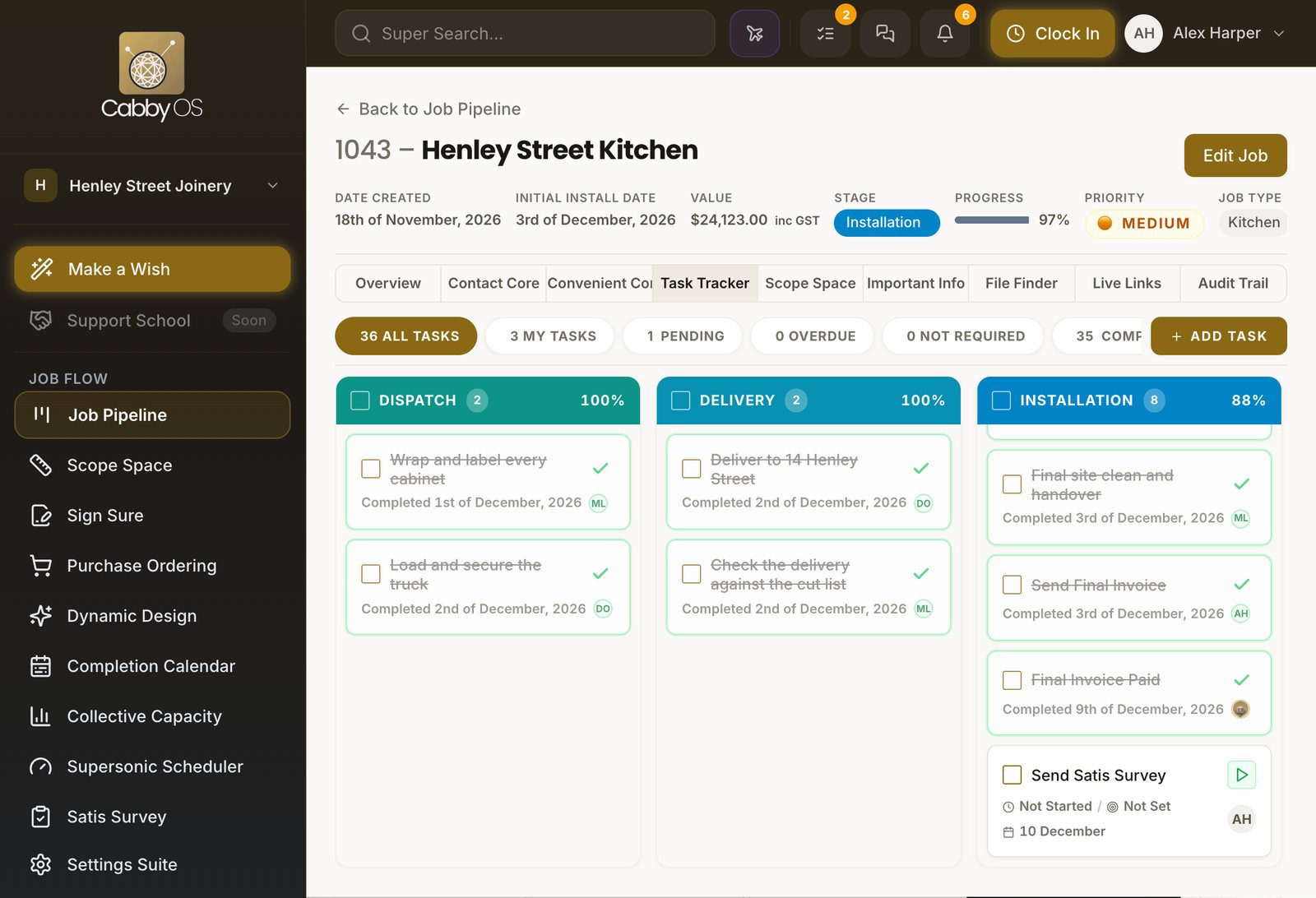
Each stage sets out its own tasks, the crew time them on the workshop tablet, and you can see who is over capacity before it costs you.

Every stage sets out its own tasks
Set your stages up once. Every job then runs the way your shop runs.
Your stages, your templates
Rename, reorder or switch off stages, and give each one its own task list.
The next stage starts itself
When your team closes the last task of a stage, the job moves on and the next tasks appear. A job with no work orders is started in production by hand.
Back to Job Pipeline
1043 – Henley Street Kitchen
OverviewContact CoreTask TrackerScope SpaceFile FinderAssembly 2100%
Assemble base run
Completed 1st of December, 2026 TBFit drawer runners
Not Started / Not SetCompleted 2nd of December, 2026 TB
Dispatch 20%
Wrap and label every cabinet
Not Started / Not Set3 DecemberLoad and secure the truck
Not Started / Not Set3 December
Your own rules do the chasing
Send an email or an alert when a task starts, finishes or runs late.
Sales tasks
When should this fire?Pick the moment that sets this trigger off- Task is startedThe moment someone starts the task
- Task is completedThe moment the task is marked done
- Before the task is dueA set number of days ahead of the due date
- When the task is dueOn the due date itself
Task is completed
How should it go out?Choose who hears about it, and how- Notify someone in the appA notification for your own team
- Email the customerSends one of your published email templates
Email the customer
Name your triggerGive it a name, say what goes out, and choose who receives itSite visit done: thank you emailThank you for your time todayPrimary contactCreate TriggerTrigger createdSite visit done: thank you email- When
- Site Visit Completed is completed
- Send
- Email: Thank you for your time today
- To
- Primary contact

The workshop runs on a tablet
One shared tablet on the floor replaces the job sheets and the clipboard.
Sign in with a PIN
Each person has their own PIN and sees their own tasks for the day.
 CabbyOS
Enter your PIN
418273Checking…Welcome back, Tom
123456789Clear0Powered by CabbyOSTasks timed as they are done
Start, pause and finish. If a task stops, the crew say why.
Stop TaskTask 1 of 1AssemblyJob nameHenley Street KitchenTaskAssemble base runTime spent1 Hour 12 MinutesProgressBlockerResponsibilityDue Date1. Why can't this task be completed? *
Select a reason...Lack of Resources — Systems, materials, tools2. What specifically about Lack of Resources? *
Select...Waiting on materialsBackContinueTimesheets that fill themselves in
Clock-ins become a weekly draft timesheet for each person.
Super Search…01:12:04TBTBGood morning, TomThursday 3 December · AssemblyActive timerAssemble base runHenley Street Kitchen · Assembly00:00:03Your tasks · 3 assigned
- Assemble base runHenley Street Kitchen · Assembly · 3 HoursRunning
- Fit drawer runnersHenley Street Kitchen · Assembly · 2 Hours
- Edge the overhead panelsMarlow Avenue Laundry · Machining · 1 Hour 30 Minutes
Today's shiftClocked in7:02 am
Shift elapsed01:12:04
Tasks assigned3
Active timerRunning
CabbyOSEnter your PIN
Checking…Welcome back, Tom
Super Search…01:12:04TBYour tasks · 3 assigned
- Assemble base runHenley Street Kitchen · Assembly · 3 HoursRunning
- Fit drawer runnersHenley Street Kitchen · Assembly · 2 Hours
- Edge the overhead panelsMarlow Avenue Laundry · Machining · 1 Hour 30 Minutes
Clocked in7:02 am
Shift elapsed01:12:04
Tasks assigned3
Active timerRunning
See who is over capacity before it hurts
The hours you quoted become the hours you plan with.
Hours booked against hours available
By department and by day, so you can see the week at a glance.
Collective CapacityChartCalendarAll departmentsMachiningAssemblyInstallation240 HoursCapacity
190 HoursBooked · 79%
50 HoursSpare
1 dayOver capacity · 3 hours
BookedSpare capacityOver capacity0h10h20h30h40h9M10T11W12T13F16M17T18W19T20FThe day that is over shows red
Open it to see who is over and who has room.
Thu 12 NovInstallation · 27 Hours booked of 24 Hours · 3 Hours over
By personBy roleDan Okafor11 Hours / 8 Hours
Installer · 11 Hours / 8 HoursMei Lin8 Hours / 8 Hours
Installer · 8 Hours / 8 HoursTom Beale8 Hours / 8 Hours
Installer · 8 Hours / 8 Hours
Pick the team with hours left
Starting a job shows who has time before you assign it.
Orders, checklists and sign-off on the job
Everything about the job stays on the job, from the first order to the last photo.
Purchase orders from the bill of materials
Cabby works out what the job needs and drafts an order for each supplier.

Your own forms and checklists
Site measures, install checks and sign-offs filled in on a phone, with photos.
InstallationPendingIn ProgressCompleted
Install checklistHenley Street Kitchen · #1043Thu 3 Dec (today)Start TimerTimer running00:00:03Task ActionForm RequiredSubmitting this form completes the task.
Open FormForm submitted
Task marked complete successfully.Install ChecklistHave Appliances been fitted? *
YesNoN/RIs Striplight fitted correctly and working? *
YesNoN/RDid you leave the house the way you found it? *
YesNoN/RAttach/Upload images of completed Work
BackSave & CloseSubmit

What's included
Everything you need to run the job

Stages and tasks
Your stages, each with its own task template.

Workshop tablet
PIN sign-in, today's tasks and timers.

Timesheets
Drafted each week from clock-ins.

Collective Capacity
Hours booked against hours available.

Purchase orders
Drafted per supplier from the bill of materials.

Forms and checklists
Your own, filled in on site with photos.


